I have a millennium electronic chess board, the chess genius exclusive. And with the PGN Tool I am able to copy PGN games and paste them to Decode Chess for analysis. But when I try to check out the analysis provided by Lichess, and click on the Import Game button, I am unable to paste the game to the box they provide for this purpose.
I also tried to paste the game from my Hiarcs Chess Explorer software, and again I am unable to paste the copied game.
What the heck is going on here? Is there a glitch on your website, or am I missing something? Thanks for your quick response.
I have a millennium electronic chess board, the chess genius exclusive. And with the PGN Tool I am able to copy PGN games and paste them to Decode Chess for analysis. But when I try to check out the analysis provided by Lichess, and click on the Import Game button, I am unable to paste the game to the box they provide for this purpose.
I also tried to paste the game from my Hiarcs Chess Explorer software, and again I am unable to paste the copied game.
What the heck is going on here? Is there a glitch on your website, or am I missing something? Thanks for your quick response.
The Import game thing is not ideal for this you can open a study and paste it into the chapter creation prompt, that way you can group games and write comments into variations etc. You can also use the cloud analysis there.
(I know this doesn't adress your problem but it's the better option anyway)
Could you paste the pgn here? Maybe something is wrong with it.
The Import game thing is not ideal for this you can open a study and paste it into the chapter creation prompt, that way you can group games and write comments into variations etc. You can also use the cloud analysis there.
(I know this doesn't adress your problem but it's the better option anyway)
Could you paste the pgn here? Maybe something is wrong with it.
[Event "?"]
[SetUp "1"]
[FEN "4k1rR/1R6/p1p5/8/4KPrp/6P1/7P/8 w - - 0 85"]
- Rhh7 R4g7 86. Rbxg7 Rxg7 87. Rxg7 hxg3 88. hxg3 Kf8 89. Ra7 a5 90. g4 a4 91. g5
a3 92. f5 a2 93. Rxa2 Ke7 94. f6+ Kf7 95. Kf5 Ke8 96. Ke6 Kd8 97. Ra7 Kc8 98. f7 Kb8
- Rd7 c5 100. f8=R+ *
Here is an example of a PGN game taken from the Millennium computer. I attempted to try your other idea, but I can't find the chapter creation prompt. Nor do I have any clue about how to use cloud analysis. Thank you so much for helping me with this.
[Event "?"]
[SetUp "1"]
[FEN "4k1rR/1R6/p1p5/8/4KPrp/6P1/7P/8 w - - 0 85"]
85. Rhh7 R4g7 86. Rbxg7 Rxg7 87. Rxg7 hxg3 88. hxg3 Kf8 89. Ra7 a5 90. g4 a4 91. g5
a3 92. f5 a2 93. Rxa2 Ke7 94. f6+ Kf7 95. Kf5 Ke8 96. Ke6 Kd8 97. Ra7 Kc8 98. f7 Kb8
99. Rd7 c5 100. f8=R+ *
Here is an example of a PGN game taken from the Millennium computer. I attempted to try your other idea, but I can't find the chapter creation prompt. Nor do I have any clue about how to use cloud analysis. Thank you so much for helping me with this.
@moecat said in #3:
Here is an example of a PGN game taken from the Millennium computer. I attempted to try your other idea, but I can't find the chapter creation prompt.
So i tried it in a study and it seems to work.
You can create a study here (the plus symbol) :
https://lichess.org/study/by/moecat
and when creating chapters in that study, you can paste the pgn text, into the field that is provided.
That's the better option imo. So it doesn't clutter up your games you played on here.
I've also tried importing it using the import dialog and that worked also, so I'm not sure why it's not working for you. Maybe some more details will help.
@moecat said in #3:
> Here is an example of a PGN game taken from the Millennium computer. I attempted to try your other idea, but I can't find the chapter creation prompt.
So i tried it in a study and it seems to work.
You can create a study here (the plus symbol) :
https://lichess.org/study/by/moecat
and when creating chapters in that study, you can paste the pgn text, into the field that is provided.
That's the better option imo. So it doesn't clutter up your games you played on here.
I've also tried importing it using the import dialog and that worked also, so I'm not sure why it's not working for you. Maybe some more details will help.
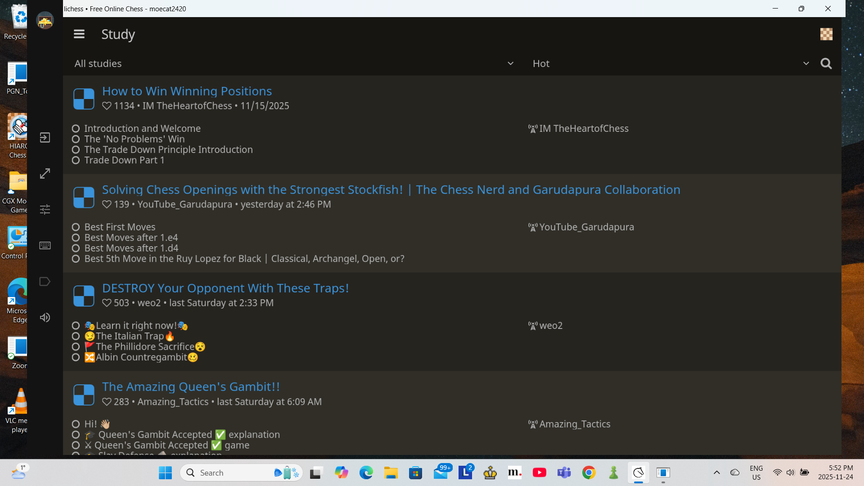
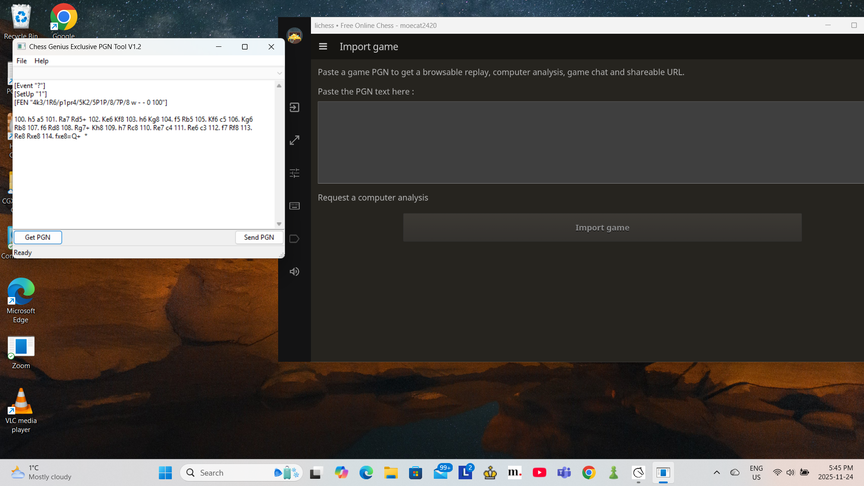
I'm not sure what you mean by giving you more detail. I tried to follow your instructions but when I tap on the Study button and get that page, I can't find any plus sign. And I don't see any way to create a chapter into which I can paste a PGN game. I thought these screenshots might help give you an idea of what I'm looking at. Please ask any question you like as to what kind of additional details I can give. Thanks again.


I'm not sure what you mean by giving you more detail. I tried to follow your instructions but when I tap on the Study button and get that page, I can't find any plus sign. And I don't see any way to create a chapter into which I can paste a PGN game. I thought these screenshots might help give you an idea of what I'm looking at. Please ask any question you like as to what kind of additional details I can give. Thanks again.
new chapter is at the foot of the 'chapter' tab ( little "+" plus 'add chapter' )
new chapter is at the foot of the 'chapter' tab ( little "+" plus 'add chapter' )
??
- 86. 100. f8=R+ *
??
lol looks indeed like sth wrong with it...
[ which makes me take wonder how @moecat got it working, also her study link is dead now. then, in that case, also: ... ]
maybe pgn requires
[opp white]
[opp black]
at least, dunno?
??
>98. 86. 100. f8=R+ *
??
lol looks indeed like sth wrong with it...
[ which makes me take wonder how @moecat got it working, also her study link is dead now. then, in that case, also: ... ]
maybe pgn requires
[opp white]
[opp black]
at least, dunno?
@moecat said in #5:
I tried to follow your instructions but when I tap on the Study button and get that page, I can't find any plus sign.
That is pretty strange it should be there, you're not on the app there right? Creating studies is not possible there. Or some custom style?
The Import game dialog just worked for me when I tried your pgn there, what's not working for you about that?
@moecat said in #5:
> I tried to follow your instructions but when I tap on the Study button and get that page, I can't find any plus sign.
That is pretty strange it should be there, you're not on the app there right? Creating studies is not possible there. Or some custom style?
The Import game dialog just worked for me when I tried your pgn there, what's not working for you about that?
I right click on the PGN game in the PGN tool from Millennium Chess and Choose "select all". Then I right click on the selected game and click on "Copy". But when I go over to the lichess import game page and right click on the field for pasting the game I get nothing. No drop down list appears giving me the option of pasting the game in that field.
And like I said before, I also tried past a PGN from Hiarcs Chess Explorer with the same result.
I right click on the PGN game in the PGN tool from Millennium Chess and Choose "select all". Then I right click on the selected game and click on "Copy". But when I go over to the lichess import game page and right click on the field for pasting the game I get nothing. No drop down list appears giving me the option of pasting the game in that field.
And like I said before, I also tried past a PGN from Hiarcs Chess Explorer with the same result.
the import game box is a textfield.
you need mousefocus respectively a cursor in it...
plus a paste option by e.g. rightclick or e.g. kontextmenu
( is it maybe that ? )
have you leftclicked first to get a cursor in there, that box?
i wouldn't expect a "drop down" within a textfield - rather a 'context menu' ( on right click - guess that's then what you mean )
~~the import game box is a textfield.
you need mousefocus respectively a cursor in it...
plus a paste option by e.g. rightclick or e.g. kontextmenu
( is it maybe *that* ? )~~
have you leftclicked first to get a cursor in there, that box?
i wouldn't expect a "drop down" within a textfield - rather a '*context menu*' ( on right click - guess that's then what you mean )

