The second screenshot in #5 looks broken. There should be a slider next to "Request a computer analysis". There should be an option to upload a PGN file instead of pasting text. The Import Game button shouldn't be so wide. What browser are you using? Do you have any extensions enabled?
The second screenshot in #5 looks broken. There should be a slider next to "Request a computer analysis". There should be an option to upload a PGN file instead of pasting text. The Import Game button shouldn't be so wide. What browser are you using? Do you have any extensions enabled?
I had been using Microsoft Edge the first time, but when you asked which browser I was using I decided to try switching to Chrome, but I got the same result. Nothing shows up when I right click in the import game field.
I had been using Microsoft Edge the first time, but when you asked which browser I was using I decided to try switching to Chrome, but I got the same result. Nothing shows up when I right click in the import game field.
Yes I made sure that I had a cursor first in the text field, but when I right click, nothing happens.
And I also tried both Microsoft Edge and Chrome as the default browser, with the same result.
Yes I made sure that I had a cursor first in the text field, but when I right click, nothing happens.
And I also tried both Microsoft Edge and Chrome as the default browser, with the same result.
How do you open the import game screen? I Use the entry in the Tools menu. Maybe you found another, broken screen?
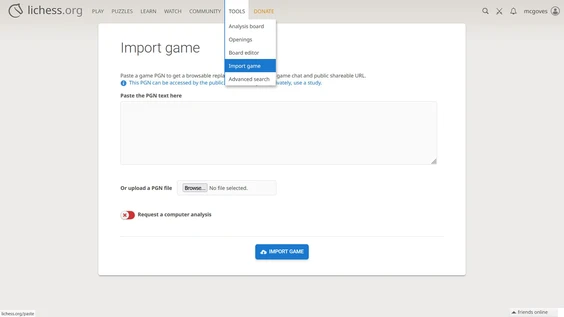
How do you open the import game screen? I Use the entry in the Tools menu. Maybe you found another, broken screen?

Why do your screenshots show the nonexistent user moecat2420? Are you using lichess.org, or some other website that uses the same software? That would explain why your screenshots look wrong (and maybe why they don't work).
Are you trying to pull a fast one?
Why do your screenshots show the nonexistent user moecat2420? Are you using lichess.org, or some other website that uses the same software? That would explain why your screenshots look wrong (and maybe why they don't work).
Are you trying to pull a fast one?
My only interest is to try to analyze a game that I played on my Millennium electronic chess board. Either against the Millennium computer itself, or against the hiarcs Chess Explorer software.
As far as my username is concerned, it is simply "moecat". I have no idea where those numbers came from.
And as far as you calling those screenshots broken, I think I might have the answer. I created those screenshots on my Android tablet, whereas I normally play chess using a Windows laptop. So perhaps that is why they don't look right to you.
I hope this helps you understand a little bit better what my situation is.
My only interest is to try to analyze a game that I played on my Millennium electronic chess board. Either against the Millennium computer itself, or against the hiarcs Chess Explorer software.
As far as my username is concerned, it is simply "moecat". I have no idea where those numbers came from.
And as far as you calling those screenshots broken, I think I might have the answer. I created those screenshots on my Android tablet, whereas I normally play chess using a Windows laptop. So perhaps that is why they don't look right to you.
I hope this helps you understand a little bit better what my situation is.
PGN looks pretty broken. I would suggest to run it through pgn-extract ( https://www.cs.kent.ac.uk/people/staff/djb/pgn-extract/ ) to correct most of the things or at least get a hint on what is wrong, e.g.
pgn-extract -s -o fixed.pgn broken.pgn
https://lichess.org/study is likely a better choice for game analysis, since studies can be made private and imported games are always public.
Most of the time people are just looking for a graph and breakdown for blunders, running analysis locally with for example https://chessmd.org might be an alternative.
PGN looks pretty broken. I would suggest to run it through pgn-extract ( https://www.cs.kent.ac.uk/people/staff/djb/pgn-extract/ ) to correct most of the things or at least get a hint on what is wrong, e.g.
`pgn-extract -s -o fixed.pgn broken.pgn`
https://lichess.org/study is likely a better choice for game analysis, since studies can be made private and imported games are always public.
Most of the time people are just looking for a graph and breakdown for blunders, running analysis locally with for example https://chessmd.org might be an alternative.
@moecat said in #16:
I created those screenshots on my Android tablet, whereas I normally play chess using a Windows laptop.
Those are Windows 11 screenshots. And Lichess on Android doesn't look like that to me.
@moecat said in #16:
> I created those screenshots on my Android tablet, whereas I normally play chess using a Windows laptop.
Those are Windows 11 screenshots. And Lichess on Android doesn't look like that to me.
Hi lonely peanut,
I would like to go back to where we left off, and you told me that you were able to get my PGN game to work for you.
Could you please give me a step-by-step description of what you did to get it to work?
Because I'm still stuck despite of all the additional input that I have gotten. Thanks again.
Hi lonely peanut,
I would like to go back to where we left off, and you told me that you were able to get my PGN game to work for you.
Could you please give me a step-by-step description of what you did to get it to work?
Because I'm still stuck despite of all the additional input that I have gotten. Thanks again.
Based on the small chessboard in the upper-right of your screenshots, I wonder if you are actually trying to use the old (obsolete, deprecated, buggy) mobile app to do these actions. That could explain why your screenshots look wrong. Perhaps you started in a browser, and at some point, the site transferred control over to the app (this has happened to me with the "progressive web app").
If you have the old app installed, I suggest you remove it.
Based on the small chessboard in the upper-right of your screenshots, I wonder if you are actually trying to use the old (obsolete, deprecated, buggy) mobile app to do these actions. That could explain why your screenshots look wrong. Perhaps you started in a browser, and at some point, the site transferred control over to the app (this has happened to me with the "progressive web app").
If you have the old app installed, I suggest you remove it.