
UPDATED: LiPulse: A simple, open chess monitor for Lichess & Chess.com
Stop the tab chaos: A free, transparent "Single File" dashboard to keep track of friends and stats across both major platforms.
If you play chess on multiple sites, you know the struggle: It’s easy to lose track of your stats, your friends, or where the action is currently happening. You end up with twenty tabs open, jumping back and forth.
That’s why I built LiPulse.
It is a free, lightweight tool designed to bring both worlds together in one clean interface. I want to show you how to use it to actually understand your own chess - going beyond simple win-rates to deep, granular analysis.
The tool is 100% Open Source and runs as a "Single File Application" directly in your browser.
Link: LiPulse.free.nf
1. Speed First, Deep Dive Later
Nobody likes waiting for loading bars. That’s why LiPulse is optimized for speed:
• Default Behavior: By default, it loads the last 100 games (if you search for a Lichess user) or the current month's archive (for Chess.com users).
• Need more? This is just for a quick form check. If you want to analyze your long-term progress, simply click the load buttons (e.g., "+1 Year" or "Max") to fetch thousands of games and populate the charts with deep data.
2. The "Deep Dive": Combining Every Filter
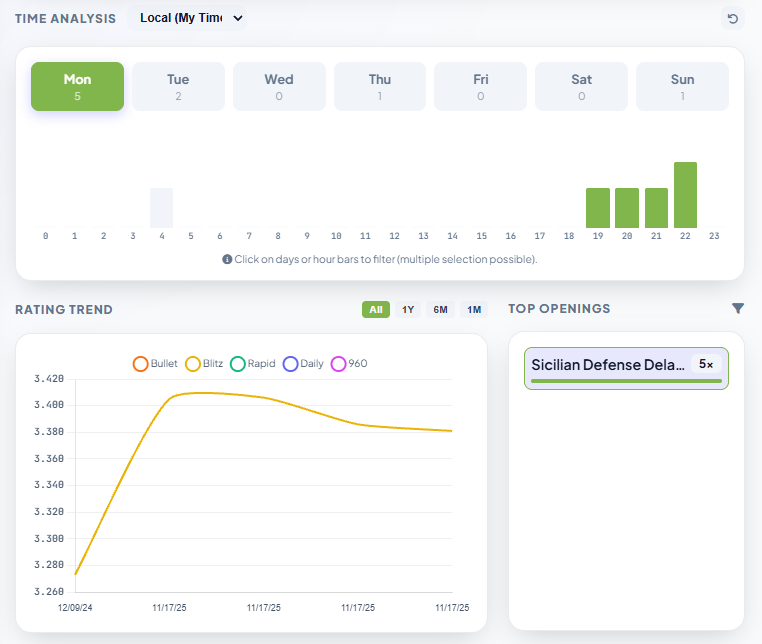
This is where the tool shines. You aren't limited to one stat at a time. You can combine the Bottom Filters (Speed/Rated), Time Filters, and Openings to answer very specific questions.
Let’s look at a specific scenario:
You want to know: "How do I perform with the Sicilian Defense, but ONLY in Rated Blitz games played on Monday nights?"
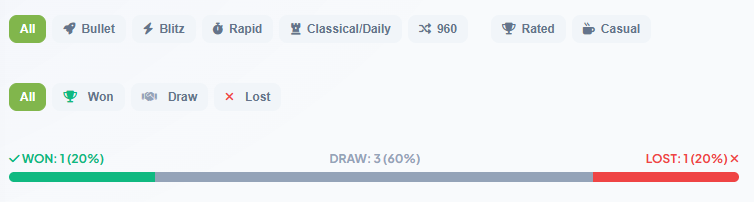
- The Bottom Bar: First, select "Blitz" and "Rated" at the bottom of the screen. Now casual games and Bullet games are gone.
- The Time: Select "Mon" in the Day filter and highlight the 19:00 to 23:00 bars in the Hour chart.
- The Opening: Click on "Sicilian Defense" in the opening list.
The result: The dashboard adapts instantly. You might discover that while you are generally good at the Sicilian, your win-rate drops to 30% on Monday nights because it requires too much calculation for a tired brain.
3. Spotting Weak Days & Nemesis Players
Beyond openings and times, LiPulse helps you answer two social and psychological questions:
• "On which days do I lose the most?"
Simply click through the days of the week (Mon, Tue, Wed...). Watch the Win/Loss Bar change. You might realize that you consistently lose rating on Fridays (maybe because you play while distracted/tired) but climb on Sunday mornings.
• "How do I play against specific people?" (Head-to-Head)
There is a search bar specifically for opponents. Type in a friend's or rival's name. The dashboard will filter only the games played against them, showing your score and Elo trend based on the currently loaded games.
(Note: Since this relies on loaded data, it only shows recent matches by default. If you really want to see your entire lifetime history against someone, the "Max" button is there if you need it.)
4. Utilities: PGN Export
Found a set of interesting games? Maybe you filtered for all your "losses" in the "King's Indian"?
You don't need to copy links manually. Just click the PGN Export button to download a file containing all the currently filtered games, ready to be imported into your engine of choice.
5. Tracking Friends (The Technical Difference)
The main feature is the "Favorites" list, showing you who is online across platforms.
A note on the Chess.com API:
Since this tool uses only public data, there is a difference in how "Online Status" is detected. While Lichess reports real-time status, Chess.com’s API primarily records the last login time.
• What this means: If a friend is playing via the Chess.com App and stays logged in, the API might not register a new "Login" event, and they might appear offline even though they are playing. It’s great for a quick check, but keep that technical limitation in mind!
6. Hidden Feature: "Pawn Rush"
If nobody is playing right now and you need to kill some time while waiting for your friends to come online, I’ve hidden a small mini-game called Pawn Rush somewhere inside the interface. I won’t tell you where the button is - you’ll have to find it yourself. ️

7. Transparent & Safe (Single File)
In an age of questionable browser extensions, trust is key.
LiPulse is a Single File Application.
• The entire tool is just one HTML file.
• There is no hidden backend server storing your data.
• The code runs 100% in your browser.
• You can "Right Click -> Save As..." to save the dashboard to your computer and run it offline.
• It is Open Source by design.
If you're looking for a simple, transparent chess companion, feel free to check it out.
Link: LiPulse.free.nf
Let me know what you think in the comments!
You may also like
 thibault
How to create a Lichess bot
Well, it depends. On you. Kevin_M06
Deep Analysis of Lichess Puzzles
Ahh... Lichess puzzles. Don't we love them? matstc
A Chess Metric: Ease (for Humans)
“I know the engine evaluation but how easy to play is this position, really?” thibault
How I started building Lichess
I get this question sometimes. How did you decide to make a chess server? The truth is, I didn't. TotalNoob69
Spaced repetition opening moves - a good idea, or a really bad one?
... where I discuss my recent addiction to chess training sites CM HGabor