
https://siderite.dev/blog/new-chrome-extension-lichess-tools/
Did you know Lichess can do this?! Commands
... yes, Lichess has a command line
Intro
Lichess is a great platform for playing chess, but it has so many features to help you become better at it, too. One of them is a sort of a command line that is very efficient in some situations, even if the number of available commands is limited.
In this blog post I will explain what the command line/search box does and how to use it effectively.
Where is it?
You can access the input box for this in several ways:
- click on the magnifying glass icon on top the screen
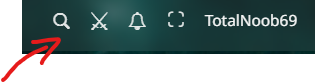
- mouse over the same icon (this is a relatively new behavior that many people are annoyed with, but it's there)
- keyboard shortcuts: s or / (the last one actually being used for quick command input)
What is it?
First, it is a regular search box. For example you could search for a user by username: press S, then totalnoob69 and Enter. This takes you to my profile page. In fact, if you type slowly enough, you will get a dropdown with possible user names: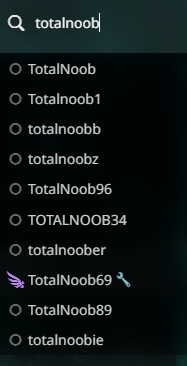 Wow! A lot of noobs on Lichess!
However, this input has a hidden feature: you can also paste a chess position in FEN format, taking you directly to the Analysis Board for it. Type "rnbqkbnr/ppp2ppp/4p3/3p4/2PPP3/8/PP3PPP/RNBQKBNR b" in the input and press Enter and you get the Diemer-Duhm Gambit!
Yet none of these can be called commands. Here is where the slash (/) character comes in. If you type / or go to the input box somehow and start typing / and then something you enter the domain of commands. The most important one to remember is /help which will give you a popup with all available commands: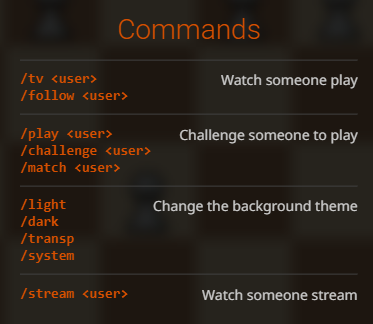 Now people like me who are keyboard oriented can easily challenge their friends using the keys, just like remembering their phone number and pressing the physical keys... ugh, I am old.
Note that follow and tv are the same command here and you don't get to add someone as a friend via the follow command.
How does it help me?
The commands in the list may not excite you too much, but given enough people know about this and use it, more commands may be added. For sure in the browser extension that I am developing, LiChess Tools, I've added a lot more of these.
Think about it this way: whenever you want a special feature in Lichess that will help you a lot, developers there have to consider the whole complexity of creating and maintaining a new user interface, complete with translations, accessible to all browsers and operating systems. And you will think "But, hey, I just wanted this one little thing! Bad devs!" And you would be wrong, not only because there are no bad devs, only bad specifications, but also because you could get that feature if you would accept to use this simple text interface. Instead of fancy buttons and inputs and toggles and dropdowns and popups, developers can now just focus on your need and make it available with minimal effort on their part.
Conclusion
Almost like a hidden feature, the search box does more than just find users. Just remember to type /help and see what commands are available to you. And if you want some technical feature to ask from Lichess (or LiChess Tools), consider if you could live with a text input for getting what you want instead of a complicated user interface.
Commands may not be at the forefront of Lichess' usefulness, but they can easily become so with enough exposure.
Did you learn something useful today? Let me know! Also tell me what you would want me to discuss again in the next installment of the Lichess features series.
The series
For a long time I was wondering why so few people on Lichess discuss the really cool features, like Explorer, Studies, Puzzles, Interactive Lessons, Tournaments, Chess classes and so many other things. I just recently realized that a lot of people just don't know about these at all. They just click on a lobby time control category and play, then play again, then leave.
I hope that I will do justice to this wonderful platform and explain some of these tools in a series of posts so you can use them for yourself. And I know people who did not know what Explorer was probably won't read my blogs, but on the off chance that they - that you - do, I hope they take some time to look deeper. This is a great place to be in!
You may also like
 TotalNoob69
Did you know Lichess can do this?! Puzzles' secret level
... not only what you see in the main menu FM MattyDPerrine
3 Lesser Known Websites to Improve Your Chess Game
Hidden gems that have flown under the radar CM HGabor
How titled players lie to you
This post is a word of warning for the average club player. As the chess world is becoming increasin… TotalNoob69
Did you know Lichess can do this?! Opening Explorer and Tablebase
... do click on that little book button TotalNoob69
The REAL value of chess pieces
... according to Stockfish thibault