
Photo by Cash Macanaya on Unsplash Cash Macanaya: https://unsplash.com/@cashmacanaya Original photo: https://unsplash.com/photos/two-hands-reaching-fo
ChessAgine Neural Net Integration

Intro
Hey all, I'm back to writing a blog about some cool integrations I have been doing to my ChessAgine GUI and MCP, and this time I'll be talking about integrating Elite Leela, Maia2, LeelaZero's Nets policy and win probability in my app. I want to start with why I have integrated these neural nets into my app, I wanted to add this neural nets in my app so ChessAgine aka Chess Agent + Engine (LLM agent) can also see what humans various ratings play via Maia2 <1900 and as well get Leela's move choice via policy and WDL rates and also see Elite Leela's moves which was trained Lichess Elite Database. By giving Agine access to such a move list as well as Stockfish's top move, Agine can reference these moves when asked about and also give the user a more human feel of suggesting the top move. This also allows users to ask Agine what Leela thinks about a certain move and how it compares to what Stockfish suggests, so the point is give Agine more vision on the board, than just follow Stockfish blindly, I think in general this is how analysis should be done, looking at engine's top move but also looking at practical moves chess players at various ELO been playing and that is why this integration is actually exciting and fun.
Neural Nets Info
Before I delve into the integration process, let me first explain what these nets are, so you have a better understanding in general.
Lc0 T-256 Net
for lc0, I didn't add Leela Engine, but the net it uses (its brain) that tells Leela Engine what moves to calculate. Lc0 for non-programmers page has a good explanation:
"Lc0 needs a neural network (also called a “weights file”) in order to play, just as a car requires a driver, or a mech requires a pilot.
In other words, Lc0 is a robot body with eyes to see the pieces and hands to move them, and the neural network is the brain of the robot that chooses the best move.
Lc0 (the shell) tells the network (the brain) where the pieces are and what the possible moves are. The network then figures out which moves are most likely to win the game. If a move looks good, the network will look at the moves that might come after it to figure out if it really is the best move. If it isn’t, it will start looking at a different, better looking move.
But this requires that the network knows what a good looking move even is. A completely new untrained network has no idea what moves are good and will choose seemingly random moves. But a trained network that has seen millions of games will know what a good move looks like and will generally choose a great, or the best, move, which Lc0 will then play." -Lc0 wiki
 ( Lc0 dev wiki page has Best nets for lc0, I'm using the T1-256 one as it will work on any browser as well as small backend API for my MCP server)
Elite Leela
Elite Leela is a quite cool neural net that was trained on more than 20 million games from the Lichess Elite Database, according to Elite Leela's dev it is quite strong especially the version 2, which I'm using in the project.
"Elite Leela v2.0.2 is an updated version of the original Elite Leela project from 2022. The model uses the same training data from the Lichess Elite Database, updated to the latest games, and trained on the new transformer model architecture that Leela Chess Zero employed. You can read more about the transformer model here: [https://lczero.org/blog/2024/02/transformer-progress/]. Elite Leela v2.0.0 and v2.0.1 won't be released, as they're considered failures during testing and practical applications through the Elite Leela lichess account, which you can find here: [https://lichess.org/@/EliteLeela]
To determine the strength of Elite Leela v2.0.2, I ran a test match against Patricia 4. Patricia 4 is an engine created by Adam Kulju, touting itself as the "most aggressive chess engine the world has ever seen". For the test match, Patricia 4 was given 4 threads and 1 GiB of Hash, per tcec-chess.com's hardware control variables that they use for CCRL engines.
The version of Leela Chess Zero used for the policy tournament was "v0.31.0-dag+git.dirty built Jan 15 2025", and both engines were running on a Ryzen 5 5600X, 32GB of 3600MHz CL16 RAM, and an RTX 3070. Both models were given a 12-ply opening book made by Chad in the Leela Chess Zero's Discord server, which has 10,000 of the most frequently played opening lines with an 86.76% coverage of total games played by humans over-the-board and in correspondence chess.
Elite Leela v2.0.2 was only given 3-4-5, 6-dtz, and 6-wdl syzygy tablebases, as Patricia 4 doesn't accept tablebases as part of engine commands. Still, tablebases were given to Cute Chess for its use, hopefully mitigating any disadvantage Patricia 4 may have gotten from not having it.
The time control was 2 minutes + 1 second increment, mimicking the test conditions of CCRL's blitz runs." - CallOn84 on GitHub
 (CallOn84 showing details on Elite leela vs Patrica 4 engine game play and showcasing how strong Elite Leela can be)
Maia2
Maia2 is a neural net created by University Of Toronto with the aim of creating a bot that feels more human, its mostly trained on games from 1100 to 1900 Lichess rated players, on their website its said
"Maia is a human-like chess engine, designed to play like a human instead of playing the strongest moves. Maia uses the same deep learning techniques that power superhuman chess engines, but with a novel approach: Maia is trained to play like a human rather than to win.
Maia is trained to predict human moves rather than to find the optimal move in a position. As a result, Maia exhibits common human biases and makes many of the same mistakes that humans make. We have trained a set of nine neural network engines, each targeting a specific rating level on the Lichess.org rating scale, from 1100 to 1900." - Maiachess.com
 (The Maia team has published papers regarding Maia2 if you are interested, do read the paper on Maia2 here)
Design Implementation Details
So to integrate these nets into the web app, I first had to think about how I'm going to serve these nets and get their policy/ move probability, and show it to the user and even highlight the arrows for each net on the chessboard. When I started I first looked at Maiachess's open source code for how they where running the model on the user's browser, after studying their codebase I learned that they had converted the nets into an onnx file (Open Neural Network Exchange) the onnx file they use is maia_rapid.onnx that is less than 100 MB just enough which can be downloaded on user's browser. I found this approach quite smart, so I decided to mostly fork their codebase, but the problem I had was that their code was just for Maia2, not for Elite Leela or lc0 t1-256x10, and also, to run Elite Leela and lc0 t1-256, I didn't find any onnx files, just nets in the pb.gz format on their GitHub. After talking to a few chess devs that I know, mainly @ Hollowleaf and Leela devs on their Discord I was able to figure out there is a way to convert any weight file from pb.gz into onnx using lc0.exe and the lc0 codebase.
 (I was able to go to their codebase and read the documentation to find out about leela2onnx command)
So after going to their site (the above pic) and their GitHub I was able to find out that running lc0.exe and passing in the weight file in as input, I can generate the onnx output. For that though I would need to build the executable file, for that I was able to follow the documentation and was able to finally run this command in terminal
lc0 leela2onnx --input=eliteleelav2.pb.gz --output=eliteleelav2.onnx
Once I got the onnx files for Elite Leela and Leela, it was time to design a system that allowed for running these nets on users' browsers as well as creating a backend API that will allow the ChessAgine MCP to call these nets via tools schema of the MCP protocol.
Since these models will run on onnx we would definitely need onnx library on the client side, and since Leela and Maia have different input/output schemas, we would need some way to abstract it out such that if someone trains a new model lets say XYZ net, my code should be easily able to support it. Below, I show how it can be done via object oriented design.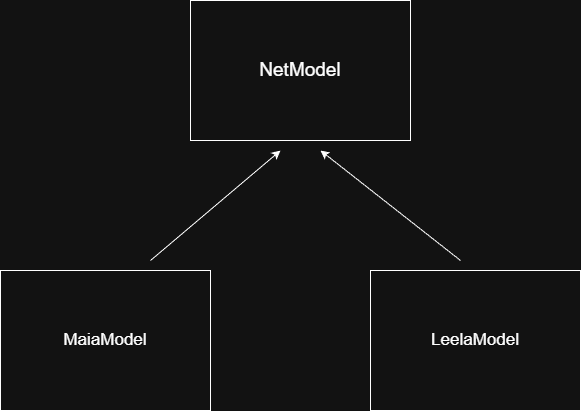
(MaiaModel and LeelaModele extends Netmodel, in future we can easily add another child class)
We can design the parent Netmodel to contain init() to start the model and downloadModel() to store the model in browser's IDB database, both Maia and Leela need these methods or any child class would need to do that, the only methods that will differ in Maia and Leela is how they eval certain position and how they eval batch of chess positions. According to Maia's codebase, Maia needs certain way to translate the board into tensors, so does Leela, I would not go in detail on the implementation as it would take an entire blog to explain everything, but if anyone is interested on the exact details they can check out the /libs/nets/
Once we have all this classes, we would need to implement API layer on top of these models class so we can create the instance of this class and use the models, on user's browser I had to create custom hook (since I'm using react, yea sad) useNets() that allows my React components to talk to the models, but on the MCP side of things I would need a ModelLoader class and express server that opens the endpoint to end client. Let me share the ModelLoader class from the API I created as its easier to show as its small, than all the complex react logic.
import { LeelaModel } from "./LeelaModel.js"
import { MaiaModel } from "./MaiaModel.js"
import {
  lichessToSanEval,
  uciEvalToSan,
} from "./sanhelper.js"
import { fetchLichessBook } from "./lichessopeningbook.js"


/* -------------------- SHARED TYPES -------------------- */

export interface MoveProbability { This is what out API will return the san aka Nf3, probability and percent
  move: string              // SAN
  probability: number       // 0–1
  percentage: string        // e.g. "34%"
}

export interface EngineAnalysis {
  topMoves: MoveProbability[]
  inBook?: boolean
  source: "lichess-book" | "maia2" | "leela" | "elite-leela"
}

/* -------------------- HELPERS -------------------- */

function toPercentageString(probability: number): string {
  return `${Math.ceil(probability * 100)}%`
}

function extractTopMoves(
  policy: Record<string, number>,
  limit = 5
): MoveProbability[] {
  return Object.entries(policy)
    .sort(([, a], [, b]) => b - a)
    .slice(0, limit)
    .map(([move, probability]) => ({
      move,
      probability,
      percentage: toPercentageString(probability),
    }))
}

  const MAIA_PATH =
  process.env.MAIA_MODEL_PATH

const LEELA_PATH =
  process.env.LEELA_MODEL_PATH

const ELITE_LEELA_PATH =
  process.env.ELITE_LEELA_MODEL_PATH
/* -------------------- MODEL LOADER -------------------- */


export class ModelLoader {
  private maiaModel!: MaiaModel
  private leelaModel!: LeelaModel
  private eliteLeelaModel!: LeelaModel

  private constructor() {}


  static async create() {
    const loader = new ModelLoader()


    loader.maiaModel = await MaiaModel.create(MAIA_PATH)
    loader.leelaModel = await LeelaModel.create(LEELA_PATH)
    loader.eliteLeelaModel = await LeelaModel.create(ELITE_LEELA_PATH)
    return loader
  }

  /* ------------------ MAIA 2 + LICHESS BOOK ------------------ */

  async analyzeMaia2WithBook(
    fen: string,
    rating: number,
    bookThreshold = 21
  ): Promise<EngineAnalysis> {
    const book = await fetchLichessBook(fen, rating)
    const games = book.white + book.draws + book.black

    if (games >= bookThreshold) {
      const sanEval = lichessToSanEval(book)

      return {
        topMoves: extractTopMoves(sanEval.policy),
        inBook: true,
        source: "lichess-book",
      }
    }

    const uciEval = await this.maiaModel.evaluate(
      fen,
      rating,
      rating
    )

    const sanEval = uciEvalToSan(uciEval, fen)

    return {
      topMoves: extractTopMoves(sanEval.policy),
      inBook: false,
      source: "maia2",
    }
  }

  /* ------------------ LEELA / ELITE LEELA ------------------ */

  async analyzeLeela(
    fen: string,
    elite = false
  ): Promise<EngineAnalysis> {
    const model = elite ? this.eliteLeelaModel : this.leelaModel
    const uciEval = await model.evaluate(fen)
    const sanEval = uciEvalToSan(uciEval, fen)

    return {
      topMoves: extractTopMoves(sanEval.policy),
      source: elite ? "elite-leela" : "leela",
    }
  }

  /* ------------------ GETTERS ------------------ */

  getMaiaModel() {
    return this.maiaModel
  }

  getLeelaModel() {
    return this.leelaModel
  }

  getEliteLeelaModel() {
    return this.eliteLeelaModel
  }
}
(ModelLoader.ts, a class that loads all the models once a request from client comes in from the model onnx files, it uses onnxruntime node see more here)
As you can see the code above, we have our MaiaModel and LeelaModel classes that we want to start and use their eval functions, our ModelLoader classes exposes methods like analyzeLeela() and analyzeMaia2WithBook() methods (Note Maia2 doesn't have any opening book training so we call the Lichess Opening explorer API and filter the rating by the rating client gives in the request). these methods allow ChessAgine to call them via API calls over MCP's tool protocol layer and communicate with neural net evals. On the browser its almost the same, but we use hooks as an API layer. I want to replace the API with hooks, but you get the point. Now that I have shared some very detailed yet high-level overview about ins and outs of the implantation and what component does what, let me show you how it looks on the client side (user's browser and Claude desktop side).
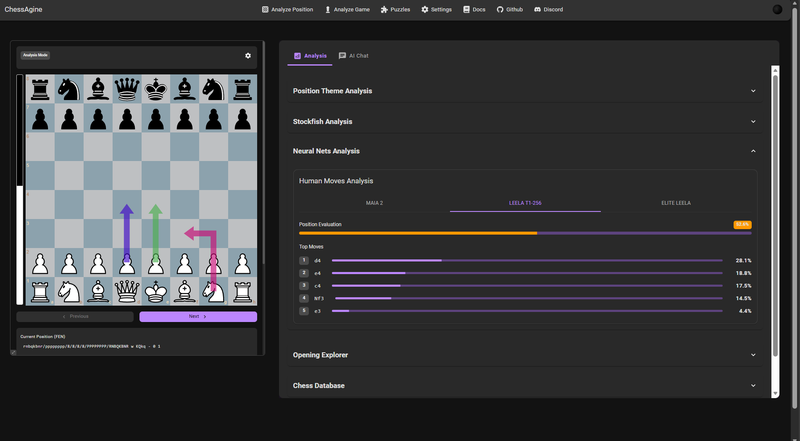
(In the ChessAgine app itself you can see all the neural nets + Stockfish suggesting top moves here, green is Stockfish, dark purple is Leela T1-256 and light pink is Elite Leela)
 (Claude can call the tools recursively to look at what fish's best move compared to Leela/Elite Leela using ChessAgine MCP)
Integration Impact
I think this integration is incredibly valuable for players at all levels. By combining neural networks with Chessagine's MCP integration, you can ask Claude + Chessagine to find the most practical moves based on real human play, whether that's from the Lichess elite database or through Maia2's human-like analysis.
The real power comes from how Chessagine uses this data to generate more practical, context-aware analysis. It can produce detailed reports that compare and contrast different approaches, giving you a solid foundation. From there, you can dive deeper using your other favourite chess tools.
Here's a concrete example: In the position below from Gukesh vs. Movahed at the FIDE Rapid/Blitz Championship, I asked Claude to analyze the position and provide top move recommendations from Leela, Elite Leela, and Stockfish. The result was a comprehensive analysis report that compared all three engine perspectives in one place. (Very equal position with multiple candidate moves, lets see Claude's report on this position: fen r2q1rk1/1p1bbpp1/p2pn2p/4p3/P3P3/2N3P1/1PPNQPBP/R2R2K1 w - - 4 16)
 (Claude conducts an analysis report for Leela, Maia, and Stockfish, also generates HTML code to render the data it got from all nets)
Here Claude was able to conclude that Leela and Maia net at various levels prefer Nc4, which is more practical, where as what Gukesh played was indeed top engine move, this report can be used to further have back and forth with Claude, than use high level text analysis into deeper deep dive by asking Claude to look into more sources like Lichess studies for similar positions, Agine with Claude can do the researching and act as helping hand than replace your own intelligence.
Conclusion :)
The other day I was reading the "AI Slop is Invading the Chess World" blog, and it got me thinking about the partnership between humans and AI in chess. When used correctly, AI tools aren't meant to replace us; they're meant to work with us as teammates.
Think of it like this: when Claude and Chessagine suggest that Nc4 creates long-term pressure, they're doing what they do best: quickly analyzing patterns and providing strong candidate moves. But that's where my role as a human begins. I take that insight and dig deeper: studying variations where d6 becomes a target, understanding the pawn structure, exploring how the position unfolds over multiple moves. The AI gives me the foundation; I build the understanding.
This is the essence of human-AI collaboration in chess. LLMs excel at generating great texts. Neural networks and engines are phenomenal at calculation and pattern recognition. But connecting those insights to create a deeper understanding? That's where human intuition, creativity, and critical thinking come in.
When humans and AI work as a team, with each contributing their strengths, that's when real learning and improvement happen. The key is using AI correctly: not as a crutch that does our thinking for us, but as a powerful partner that amplifies what we can achieve.
Hope you had a great read, and thanks for reading!
Noob
You may also like
 HollowLeaf
Integrating Maia2 (The Human-Like Chess Engine) into My Chess Application
A beginner-friendly look at human-style AI, neural networks, ONNX models, opening books, and everyth… HollowLeaf
Using Maia and Leela Chess Zero to Find Repertoire Gaps
A novel idea for chess developers RuyLopez1000
AI Slop is Invading the Chess World
Claiming that AI can teach chess is the latest fad HollowLeaf